
What is a CNAME record?
Email TechnologySecurity InsightsTechnical Guidance


Contents
A CNAME (Canonical Name) record is a Domain Name System (DNS) record that makes one DNS name an alias of another DNS name.
If you publish a CNAME at alias.example.com pointing to target.example.net, you are teaching the DNS that when someone looks up alias.example.com, the answer is “use target.example.net instead.” The resolver then looks up target.example.net to get the records it actually needs.
How Are CNAMEs used?
CNAMEs are mainly about delegation and change management.
Instead of publishing the full data directly (which could change), you publish an alias to a name that someone else controls. That “someone else” could be a SaaS provider, an email service provider, an authentication platform, or someone else. If they need to change something later, be it infrastructure, the content of a TXT record, or where a website points, they update the target side of the CNAME; the DNS record in your domain’s DNS can stay the same.
As a result, it is common for a service provider to request CNAMEs be added to your domain when they need to manage DNS-dependent setup without asking you to keep editing DNS frequently.
CNAME Record examples
Take the following typical situation:
Imagine you own the domain example.com. You have a provider, service.example.net, who hosts the content of your website for you. They ask you to create a CNAME record for www.example.com with a value of service.example.net.
This allows you to keep your domain name as the brand for your site, but delegates the management of the technology supporting your site to service.example.net, which the service provider controls. It allows them to make changes to the DNS related technology making your site work without needing you to take any action. This form of redirection is often called CNAME-based delegation.
How DMARC and CNAME Records work together
Email authentication uses DNS to host records that permits SPF, DKIM, and DMARC to function. These records are queries by systems of email recipients to verify if the sender is who they say they are. DMARC specifically requires alignment to pass. Alignment requires that the domain in an email’s visible “From:” header matches the domain verified by SPF or DKIM authentication. SPF and DKIM record values must be published using a TXT DNS resource record type.
A CNAME can also be used to point to another domain where that record is hosted. This is often employed by third-party service providers who want to manage those records in their own DNS, but want to support DMARC’s alignment requirements.
Many organizations provide email services, from business email providers like Microsoft 365 to third-party marketing service providers like MailChimp. It is common for these services to employ CNAME-based delegation for email authentication DNS records so that they can make changes directly.
DKIM Delegation
DKIM (DomainKeys Identified Mail) is often delegated to the service provider responsible for sending your emails. When asked to publish a DKIM record, it looks like:
selector._domainkey.example.com
Many providers have you create a CNAME that looks similar to the above, pointing to a provider-controlled name such as:
selector._domainkey.service.example.net
The service provider then publishes the actual DKIM public key record in their domain. This makes key rotation easier because the provider can update the key without you having to take any actions.
CNAME rules to follow
A CNAME must be the only record at its DNS name
If x.example.com has a CNAME record, there must not be any other data records at x.example.com, as per DNS standards (RFC 1034). If there are, they will be ignored by the system querying this DNS name and they will only process the CNAME record, following where it leads.
CNAMEs are usually not allowed at the root domain (example.com)
The root of a domain needs records like NS and SOA. Because a CNAME cannot coexist with other record types, a standard CNAME at the root domain is not allowed in normal DNS hosting. Some DNS providers offer an “alias at apex” feature (often called ANAME), but those are different solutions and are not standard CNAME records.
A CNAME cannot point to an IP address
The content, or value of a CNAME record must always be a domain. If you need to point directly to an IP, you must use the A (IPv4) or AAAA (IPv6) resource record types to do so.
CNAMEs chains and loops can break lookups
A CNAME can point to another CNAME, creating a chain of aliases. Long chains, or misconfiguration such as loops (e.g. two CNAMEs pointing to each other) can cause resolution failures or confusing, intermittent verification results.
Common CNAME Issues
The CNAME is published under the wrong DNS name
All providers don’t follow the same practice when it comes to asking customers to add CNAMEs in their domain. Following are examples of what they may request:
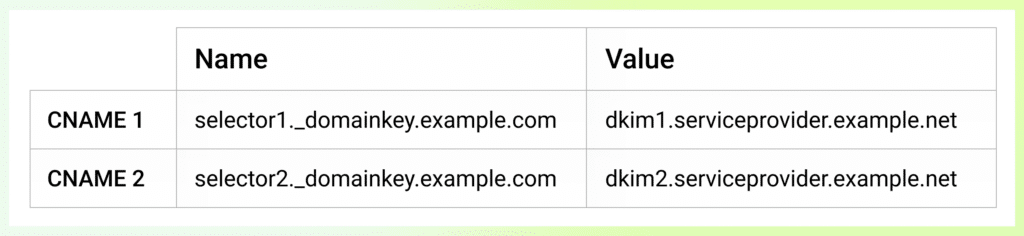
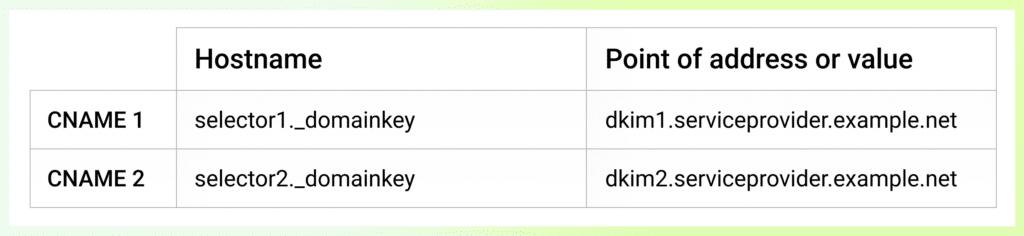
DNS providers’ consoles also vary in design. Some may require the fully qualified domain name in the DNS name field, that is your domain, and all subdomain labels such as selector1._domainkey.example.com. While others, like GoDaddy, only require everything preceding your root domain name. In the above example, this means the console would expect you to enter selector1._domainkey in the DNS name field only when choosing to add a record for example.com.
For example:
- Your domain is example.com.
- The provider asks you to add a CNAME of selector1._domainkey.example.com.
- You add selector1._domainkey.example.com in the DNS name field in GoDaddy’s console.
- The result would be selector1._domainkey.example.com.example.com, which is incorrect.
Leaving Dangling CNAME records
Because a CNAME delegates part of your namespace to a target the provider controls, the record keeps resolving even after that target stops existing. If you stop using a service, say you migrate away from a sending provider, but leave the SPF (return-path) delegation, the alias still resolves to a name the provider no longer has assigned to you. This is called a dangling CNAME.
The risk is that the unclaimed target can be re-registered by someone else. On many platforms, a third party who provisions a resource under that same name then controls whatever your subdomain delegates to it, and they hold that control until you remove or repoint the record.
The result is a subdomain take-over. In an email authentication context, an attacker who claims the target of a stale SPF delegation via CNAME could publish their own record under your domain’s namespace and send emails that pass DMARC spoofing your domain.
How to Fix Dangling CNAMEs
The fix is record hygiene tied to the service lifecycle. Remove the DNS record when you stop using the service. Treat CNAME cleanup as a required step when offboarding any provider, and periodically review existing delegations to confirm the target is still one you are using or intend to use.
CNAMEs are a powerful and common DNS tool used by domain owners and service providers alike to centralize management of many record types, including to support SPF and DKIM alignment for the purpose of DMARC compliance. Because they are crossing administrative boundaries by delegating part of your domain namespace to a third party, the record must be tracked and published only when the service provider directs it. Any record left behind after a service is sunset becomes a dangling delegation and a subdomain-takeover risk, so unused CNAMEs should be removed from your DNS promptly.
Want to continue the conversation? Head over to the dmarcian Forum.
Did you like this article?

 October 16, 2026
 October 16, 2026